Skip to content Skip to navigation

Site Retired

As of May, 2022, this website is no longer updated and has been replaced with a static copy.

John Bickar's Blog Posts

Photo of John Bickar Posted by John Bickar on Friday, June 26, 2015 - 9:05am

A simple task: list all the users on a site, optionally filtering by role or by status. Difficulty: using drush.

I had searched around a bit for this functionality and my Google-fu had failed me, so I decided to build off of work that already had been done and write a drush user-list command. (The internal monologue went something like this: "Is this a thing? It doesn't look like this is a thing. This should be a thing. Why is this not a thing? Let's make this a thing.")

Installation

Download user_list from Github or drupal.org and place it where you place the rest of your drush commands (e.g., in ~/.drush/ or /usr/share/drush/commands/)

Use

drush user-list

Returns a table of all users on the site.

drush user-list --status=active

Returns a table of all active users on the site.

drush user-list --roles="administrator,site owner"

Returns a table of all users with the role "administrator" or "site owner" on the site.

That's pretty much it.

Posted in:
Photo of John Bickar Posted by John Bickar on Tuesday, March 17, 2015 - 8:00am

University IT will perform maintenance on all websites on the Stanford Sites Drupal hosting service on the following dates:

  • Friday, March 20, from 9 a.m. - 5 p.m.: personal sites hosted on people.stanford.edu

  • Saturday, March 21, from 4 a.m. - 8 a.m.: group and department sites hosted on sites.stanford.edu

  • Sunday, March 22, from 4 a.m. - 8 a.m.: group and department sites hosted on sites.stanford.edu

These changes are significant and include updating Drupal core to the latest release, security-related module upgrades, new modules, and theme updates for both Drupal 6 and 7 sites. See below for a complete list of updated and new modules, and this related blog post for a complete overview of theme updates.

Websites are scheduled to receive upgrades on a rolling basis. Please note that when the upgrade begins on a website, all logged-in users (if any) will be logged out, and the website will be placed offline temporarily. Visitors will see a message that the website is offline for maintenance. Security patches and database updates will be applied, and the website will be placed back online. We expect the website to be offline for approximately 1 minute during the updates.

If you experience issues with your website hosted on Stanford Sites, please submit a HelpSU request. We will respond as soon as possible. Thanks for using Stanford Sites!

What is included in the upgrade

* = new addition to Stanford Sites

Drupal 7:

  • admin_menu 7.x-3.0-rc5 (fixes bug with Firefox)
  • admin_views 7.x-1.4
  • better_exposed_filters 7.x-3.0
  • colorbox 7.x-2.8 *
  • context 7.x-3.6
  • ctools 7.x-1.7
  • drupal core 7.35
  • encrypt 7.x-2.0 *
  • entity 7.x-1.6
  • features 7.x-2.4
  • feeds_jsonpath_parser 7.x-1.0-beta2*
  • feeds_xpathparser 7.x-1.0
  • flag 7.x-3.6
  • google_analytics 7.x--2.1
  • mollom 7.x-2.13
  • node_convert 7.x-1.2 *
  • relation 7.x-1.0-rc7 (that's a lot of RCs)
  • rules 7.x-2.8
  • social_share 7.x-2.1 *
  • stanford_capx 7.x-1.1 *
  • stanford_courses 7.x-3.4
  • stanford_events_importer 
  • stanford_person 7.x-4.1 *
  • stanford_sites_helper 7.x-1.4
  • token 7.x-1.6
  • views 7.x-3.10
  • views_datasource 7.x-1.0-alpha2 *
  • webform 7.x-4.5
  • workbench_moderation 7.x-1.4
  • xmlsitemap 7.x-2.2


Drupal 6:

  • mollom 6.x-2.12
  • views 6.x-2.18
  • webform 6.x-3.22
 
Posted in:
Photo of John Bickar Posted by John Bickar on Friday, February 13, 2015 - 2:00pm

If you're using Behat and the Drupal Extension, you might find the following code snippet helpful if you want to add a step to wait for batch jobs to finish.

If one of your Behat scenarios kicks off a batch job (e.g., a Feeds import), and you want to wait for that batch job to finish before moving on to the next step, add this step definition in your FeatureContext.php file:

  /**
   * Wait until the id="updateprogress" element is gone,
   * or timeout after 3 minutes (180,000 ms).
   *
   * @Given /^I wait for the batch job to finish$/
   */
  public function iWaitForTheBatchJobToFinish() {
    $this->getSession()->wait(180000, 'jQuery("#updateprogress").length === 0');
  }

Then, in your featurename.feature file, you can call this step like so:

When I press the "Save" button
And I wait for the batch job to finish
Then I should see "created"

This will cause the web driver to wait until the batch job is finished (or, more accurately, to wait until there is no longer an id="updateprogress" element on the page), or else timeout after 3 minutes (180000 ms). You can adjust the timeout to whatever you want by changing that 1800000 number. You will have to use the @javascript context in your feature to use this step definition.

(Note that a request to add this step definition to the Behat Drupal Extension has been submitted.)

See The Code

Posted in:
Photo of John Bickar Posted by John Bickar on Tuesday, January 20, 2015 - 9:00am

I gave a lightning talk at the Stanford University IT Unconference on October 30th, 2014, titled, "The (Wo)Man and the Machine: Automated Testing, User Stories, and Code Refactoring".

In five minutes, I outline how (and more importantly why) we use Behat to run automated tests to improve user experience and support large-scale code deployment and refactoring.

Video is below.

Slides are here (PDF).

Transcript is here.

Thanks to the Office of Accessible Education for providing the tools for transcribing and captioning this video.

Tags:
Photo of John Bickar Posted by John Bickar on Friday, October 31, 2014 - 2:43pm

Drupal 7.32 was released on October 15th to fix a critical security vulnerability. All Drupal 7 sites on sites.stanford.edu and people.stanford.edu were upgraded that day. On October 29th, a further Public Service Announcement was released, detailing the severity of the vulnerability and steps to take if you believe that your Drupal 7 site may have been compromised.

Given this recent PSA, we are continuing to audit all sites on the Stanford Sites platform in coordination with the Information Security Office (ISO).

If you have questions about your Drupal 7 website at Stanford and would like further information about how the vulnerability may affect you, please submit this form, and University IT will contact you to help.

Common questions

Q: Do you have recommendations on how a site owner should investigate this problem for Drupal 7 sites not hosted in sites.stanford.edu or people.stanford.edu?

A: Yes, though the answer is complex. The most thorough process for investigation and remediation is detailed in the flowchart at: Your Drupal Website Has a Backdoor

Please note that if you did not upgrade your website on October 15, simply upgrading to Drupal 7.32 now may not be enough. You may need to take additional steps to look out for signs your website has been compromised.

Q: The PSA says that "Attackers may have copied all data out of your site." Does this include the database access info in the settings.php file?

A: Unfortunately, yes. The vulnerability that was announced (and patched) on October 15th allows an attacker unfettered access to your Drupal codebase, files, and database.

What to do now

Every content management platform requires regular maintenance and security upgrades, and there are several options available to you for help.

First, know where your website is hosted and know what version of Drupal you are using and when it was last upgraded. If you need help answering these questions, please contact University IT through submitting this form, and we will be happy to assist.

Next, if you know that your Drupal 7 website is not hosted on Stanford Sites and it is not yet upgraded, please do the following ASAP:

  1. Take immediate steps to upgrade, or contact your web developer to do so.
  2. Watch for signs of a compromised site, or submit this form to request University IT help with monitoring.

Further Reading

Thank you for taking these important steps to ensure the security of your websites for Stanford University.

Posted in:
Photo of John Bickar Posted by John Bickar on Monday, October 6, 2014 - 1:16pm

IT Services and Administrative Systems will perform updates for all websites hosted on the Stanford Sites Drupal hosting service on the following date:

  • Thursday, October 9th, from 4 - 8 a.m.

In this update, the Linux server software will be upgraded from Debian "Squeeze" to Debian "Wheezy".

No downtime is expected.

If you experience issues with your website hosted on Stanford Sites, please submit a HelpSU request. We will respond as soon as possible.

* Note: this upgrade does not apply to personal websites hosted on people.stanford.edu, as those servers were upgraded on a previous date.

Posted in:
Photo of John Bickar Posted by John Bickar on Wednesday, September 3, 2014 - 8:10am

IT Services will perform updates for all websites hosted on the Stanford Sites Drupal hosting service on the following dates:

  • Friday, September 5, from 9 a.m. - 5 p.m.: Personal websites hosted on Stanford Sites (at people.stanford.edu)
  • Saturday, September 6, from 4 - 8 a.m.: Group and department sites hosted on Stanford Sites
  • Sunday, September 7, from 4 - 8 a.m.: Group and department sites hosted on Stanford Sites

The changes are significant and include security patches and upgrades for both Drupal 6 and 7 sites. See below for a complete list of module updates, and this related blog post for a complete overview of theme updates.

Websites are scheduled to receive upgrades on a rolling basis. Please note that when the upgrade begins on a website, all logged-in users (if any) will be logged out, and the website will be placed offline temporarily. Visitors will see a message that the website is offline for maintenance. Security patches and database updates will be applied, and the website will be placed back online. We expect the website to be offline for approximately 1 minute during the updates.

If you experience issues with your website hosted on Stanford Sites, please submit a HelpSU request. We will respond as soon as possible.

What is included in the upgrade

Drupal 7:

  • Drupal 7.31
  • Administration views (admin_views) 7.x-1.3
  • Backup and Migrate (backup_migrate) 7.x-3.0
  • Better Exposed Filters (better_exposed_filters) 7.x-3.0-beta4
  • Block Class (block_class) 7.x-1.3
  • Computed Field (computed_field) 7.x-1.0
  • Content Access (content_access) 7.x-1.2-beta2
  • Context (context) 7.x-3.2
  • context_list_active (context_list_active) 7.x-1.0-alpha2
  • Date (date) 7.x-2.8
  • Email (email) 7.x-1.3
  • Features (features) 7.x-2.2
  • Feeds Tamper (feeds_tamper) 7.x-1.0
  • Feeds XPath Parser (feeds_xpathparser) 7.x-1.0-beta4
  • File (Field) Paths (filefield_paths) 7.x-1.0-beta4
  • Flag (flag) 7.x-3.5
  • Insert (insert) 7.x-1.3
  • Libraries (libraries) 7.x-2.2
  • Link (link) 7.x-1.2
  • Menu Block (menu_block) 7.x-2.4
  • Metatag (metatag) 7.x-1.0-rc2
  • Module filter (module_filter) 7.x-1.8
  • Mollom (mollom) 7.x-2.10
  • Node clone (node_clone) 7.x-1.0-rc2
  • OpenLayers (openlayers) 7.x-2.0-beta9
  • Pathologic (pathologic) 7.x-2.12
  • Relation (relation) 7.x-1.0-rc5
  • Rules (rules) 7.x-2.7
  • Site Verification (site_verify) 7.x-1.1
  • Taxonomy Manager (taxonomy_manager) 7.x-1.0
  • Transliteration (transliteration) 7.x-3.2
  • Views Data Export (views_data_export) 7.x-3.0-beta8
  • Views Slideshow (views_slideshow) 7.x-3.1
  • Webform (webform) 7.x-4.0
  • Cube (cube) 7.x-1.4
  • Rubik (rubik) 7.x-4.1
  • Tao (tao) 7.x-3.1
  • Stanford Date Formats (stanford_date_formats) 7.x-1.0
  • Stanford Date Timepicker (stanford_date_timepicker) 7.x-1.0-alpha3
  • Stanford Events Importer (stanford_events_importer) 7.x-3.0-alpha7
  • Stanford Image (stanford_image) 7.x-3.0
  • Stanford Image Styles (stanford_image_styles) 7.x-3.0
  • Stanford News (stanford_news_
  • Stanford Sites Helper (stanford_sites_helper) 7.x-1.2
  • Stanford Slides (stanford_slides) 7.x-3.0-alpha3
  • Stanford Video (stanford_video) 7.x-2.0
  • WebAuth Module for Drupal (wmd) 7.x-3.3
  • WebAuth Extras (webauth_extras) 7.x-1.0-alpha2
  • Stanford Drupal Profile (stanford) 7.x-1.1
  • iCalcreator 2.20.2
  • jquery-ui-timepicker v1.4.5

Drupal 6:

  • Date (date) 6.x-2.10
  • Feeds (feeds) 6.x-1.0-beta13
  • Feeds Tamper (feeds_tamper) 6.x-1.0
  • FileField (filefield) 6.x-3.13
  • ImageField (imagefield) 6.x-3.11
  • Link (link) 6.x-2.11
  • Node form columns (nodeformcols) 6.x-1.7
  • Rubik (rubik) 6.x-3.0-beta5
Posted in:
Photo of John Bickar Posted by John Bickar on Wednesday, August 6, 2014 - 6:31am

IT Services and Administrative Systems will perform updates for all websites hosted on the Stanford Sites Drupal hosting service on the following date:

  • Saturday, August 9th, from 4 - 6 a.m.

In this update, the MySQL database software will be upgraded from version 5.1 to 5.5.

Please note:

All websites on people.stanford.edu and sites.stanford.edu will be offline for a period of 1.5 - 2 hours starting at 4AM. Site visitors will be redirected to an outage page while the upgrades are in progress.

If you experience issues with your website hosted on Stanford Sites, please submit a HelpSU request. We will respond as soon as possible.

Posted in:
Photo of John Bickar Posted by John Bickar on Tuesday, August 5, 2014 - 7:11am

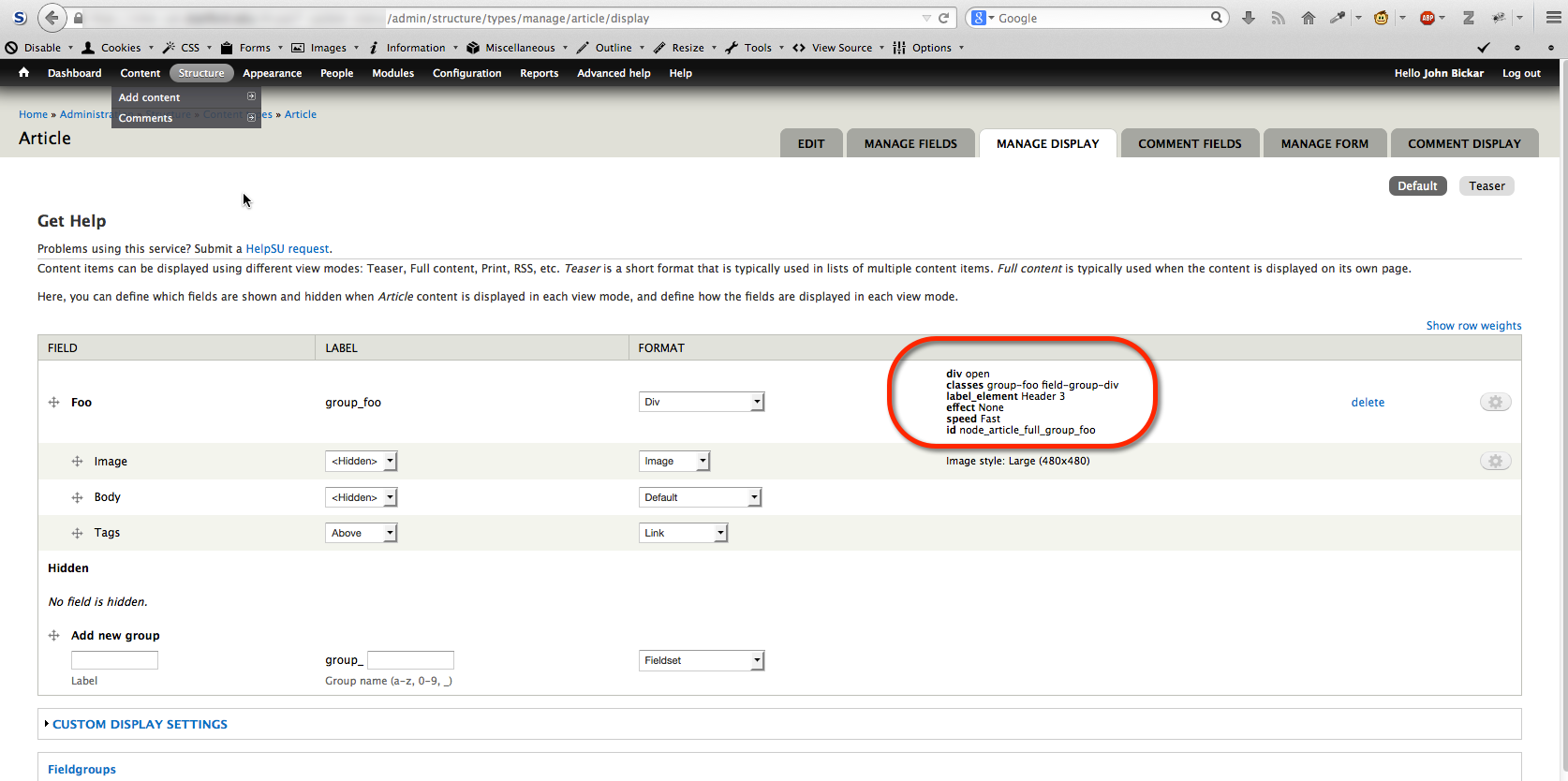
In July, 2014, the Field Group module was updated from 7.x-1.1 to 7.x-1.4 on Stanford Sites. This update has the potential to cause issues with CSS, as certain types of markup were removed from the HTML output of the page.

Background

The Field Group module allows site builders to group fields together on the back-end edit form of entities (e.g., nodes, BEANs), and on the front-end display of those entities. The latter is what was affected.

The Issue

In Field Group 7.x-1.1, field groups that were configured as <div> elements would get a class of group_groupname and group-groupnameapplied to them (note the underscore and the hyphen in each class):

<div class="field-group-format group_foo field-group-div group-foo  speed-fast effect-none">

In Field Group 7.x-1.4, the group_groupname has been removed, but group-groupname persists:

<div class=" group-foo field-group-div" id="node-article-full-group-foo">

Before (7.x-1.1)

Configuration screen for Field Group

After (7.x-1.4)

Configuration screen for Field Group

The Fix

If you have CSS like the following:

.group_foo {
  border-right: 1px solid #000000;  
}

simply update it to this:

.group_foo, .group-foo {
  border-right: 1px solid #000000;  
}

Better yet, the Field Group module allows you to assign your own classes and IDs to field group elements, so you should add those and target those names in your CSS (therefore not relying on the markup output by the Field Group module). Read Megan Miller's excellent article, "How I learned the hard way to create reusable classes" for more on that subject.

Posted in:
Photo of John Bickar Posted by John Bickar on Monday, July 21, 2014 - 12:08pm
IT Services will perform updates for all websites hosted on the Stanford Sites Drupal hosting service on the following dates:
 
  • Friday, July 25, from 9 a.m. - 5 p.m.: Personal websites hosted on Stanford Sites (at people.stanford.edu)
  • Saturday, July 26, from 4 - 8 a.m.: Group and department sites hosted on Stanford Sites
  • Sunday, July 27, from 4 - 8 a.m.: Group and department sites hosted on Stanford Sites
The changes are significant and include security patches and upgrades for both Drupal 6 and 7 sites. See below for a complete list.
 

Websites are scheduled to receive upgrades on a rolling basis. Please note that when the upgrade begins on a website, all logged-in users (if any) will be logged out, and the website will be placed offline temporarily. Visitors will see a message that the website is offline for maintenance. Security patches and database updates will be applied, and the website will be placed back online. We expect the website to be offline for approximately 1 minute during the updates.

If you experience issues with your website hosted on Stanford Sites, please submit a HelpSU request. We will respond as soon as possible.
 

What is included in the upgrade


Drupal 7:

  • drupal-7.28
  • admin_views-7.x-1.2
  • context_http_headers-7.x-1.x-dev
  • context_respect-7.x-1.x-dev
  • context_useragent-7.x-1.x-dev
  • css_injector-7.x-1.x-dev
  • ctools-7.x-1.4
  • entity-7.x-1.5
  • features-7.x-2.0
  • feeds-7.x-2.0-alpha8
  • field_collection-7.x-1.0-beta7
  • field_group-7.x-1.4
  • file_entity-2.0-alpha3
  • google_analytics-7.x-2.0
  • nodeformcols-7.x-1.0
  • services-7.x-3.7
  • uuid-7.x-1.0-alpha5
  • views-7.x-3.8
  • views_bulk_operations-7.x-3.2
  • webform-7.x-3.20
  • xmlsitemap-7.x-2.0
  • stanford_bean_types-7.x-2.0
  • stanford_carousel-7.x-2.0-alpha1
  • stanford_courses-7.x-3.2
  • stanford_date_formats-7.x-1.0-alpha2
  • stanford_date_timepicker-7.x-1.0
  • stanford_events_importer-7.x-3.0-alpha3
  • stanford_image-7.x-3.0-alpha2
  • stanford_image_styles-7.x-3.0-alpha1
  • stanford_metatag_nobots-7.x-3.0-alpha2
  • stanford_page-7.x-2.0-alpha3
  • stanford_sites_helper-7.x-1.1
  • stanford_sites_systemtools-7.x-1.1
  • stanford_slides-7.x-3.0-alpha1
  • stanford_video-7.x-2.0
  • stanford_wysiwyg-2.2
  • webauth_extras-7.x-1.0-alpha1


Drupal 6:

  • drupal-6.32
  • ctools-6.x-1.11
  • filefield-6.x-3.12
  • menu_block-6.x-2.4
  • print-6.x-1.19
  • webform-6.x-3.20
  • stanford_sites_helper-6.x-1.0-beta2
  • stanford_video-6.x-2.0-alpha5


Posted in:

Pages

Subscribe to John Bickar's Blog Posts