Skip to content Skip to navigation

Site Retired

As of May, 2022, this website is no longer updated and has been replaced with a static copy.

Linnea Ann Williams's Blog Posts

Linnea Williams profile pic Posted by Linnea Ann Williams on Friday, October 7, 2016 - 11:45am

One of the challenges we at Stanford Web Services face as both a software development group as well as a client-facing web design team is finding time to create new and innovative tools for campus amidst client projects. Most of the time we are heads down, working with clients to launch scores of websites each year. So how do we approach innovating for campus?

Ever since we opened our doors in 2011, our team has taken one week about once a quarter to turn off our email, cancel meetings and sprint on campus-wide tools. During those weeks, we create new reusable solutions, research future technologies, and fix nagging bugs. These heads down weeks, or "product sprint weeks", have become a source of some of our biggest wins for campus.

Product sprint weeks lead to product improvement and popular features

New fancy tools

In past product sprints, our team created some of the tools that transformed the services and products we offer to campus. Examples include:

  • Our first Jumpstart product: a clean and easy-to-use static website solution designed to support clients with simple web needs much faster. Jumpstart Simple became the core of our Jumpstart product approach to building websites for Stanford.

  • Customize Design: an extension to our products making it possible to create a homepage layout switcher with more design options.

  • Stanford Framework's multiple design options: multiple website color palette and font options that allow clients to make websites suited to them.

  • Landing Page: a special page type with three different layouts making it easy for clients to present complex content more clearly.

Research and documentation

We've also used this time time to investigate and invest in new technologies, or improve documentation. Examples include:

  • Evaluating Drupal 8: researching the state of Drupal 8 and how we might approach adopting it.

  • Creating automated tests: building infrastructure and test scripts with the Behat testing framework to check the functionality of every module on Stanford Sites’ stack during regular security updates.

  • Redesigning the Jumpstart user guide: answering common questions and improving navigation and search options to help clients.

Fixing nagging bugs

We've also used this time to root out the source of nagging bugs or usability issues affecting multiple websites. As Jumpstart grows and supports more sites, these nagging bugs can become big pains if not resolved early. In fact, one sprint was dedicated to pet peeves that we and our partners and clients faced again and again. Bug fixing doesn't always give you the TED talk material that innovation does, but it sure makes everyone's lives better!

Best results happen with the entire team

To create the best solutions, it's important for every voice on the team to be heard and for all our unique skills to come to bear on the solutions we offer to campus. Product sprint weeks allow teammates who otherwise may not interact much on a daily basis to have the opportunity to work together on mini task forces, sharing lessons learned from multiple projects. We also make a point of spending little time at desks or in offices, instead choosing to work in a shared collaborative space so that we are working side-by-side all week long. Sharing a mission and space (and delicious snacks) boosts our team spirit, and the week ends in a fun demo day where we celebrate what was built and settle on next steps.

A one week sprint

When we have time to focus on critical issues and goals without the interruption of meetings, we get more work done more quickly, and a week is required for any substantial development to take place. Also, because we "get in a groove" the focus of the team grows along with momentum each day, so we gain more and more goodness for campus. (That said, our clients are important to us, so we wouldn't want to pause their projects for longer than a week!)

Thank you to our clients and partners!

It’s through your support, ideas, and feedback that we have driven the product improvements made to Jumpstart since its very inception. If you’d like to see something new in Jumpstart, tell us about your idea in the Jumpstart Suggestion Box. And we’ll look forward to sharing what we’ve created after our next sprint at the beginning of November.

Linnea Williams profile pic Posted by Linnea Ann Williams on Friday, August 21, 2015 - 10:30am

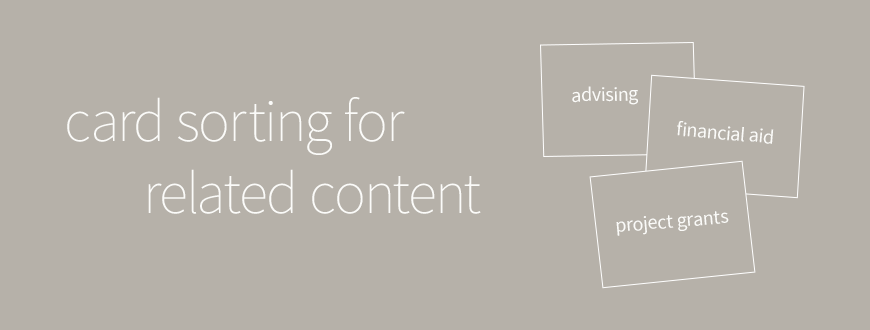
Card sorting is a powerful, hands-on tool that we at Stanford Web Services use for helping content creators iron out either the information architecture of their site (meaning the big buckets of their navigation) or to develop categories for their content. 

Recently, we used card sorting to develop a secondary sidebar navigation of "Related Content" that crossed the main navigation of a website, and these are my takeaways.

Card sorting is really great for helping people wrap their brains around content using design thinking. By creating cards, each with a single term, category, or page name written on them, we can sort the content of a site, figuring out what things belong together and how best to group the content in logical way.

For a standard card sort to find information architecture (IA), we usually make cards for each known page or chunk of content and then group by subject. For this kind of card sort first instincts work well. But what do we do if already have the primary IA figured out and we're trying to find a secondary way to sort our content? We have to change up our thinking a bit.

Prepping cards for the sort: Include full navigational path

The first thing to do before a card sort is prep the cards. In a standard IA page sort, we include the page title and maybe a little additional information for context. But in our case, where we are trying to determine a secondary way to sort content that is different than the navigation scheme, we needed to know more than just the content itself.

I wanted to be able to see quickly if we were grouping pages that were already grouped by our primary navigation, so I printed the full navigational path with each level on a new line. I did not include cards for the top level navigation pages, since that level of page would not feature our sidebar block of "Related Content."

 For example:

Academics
Undergrad Program
Physics Major
Curriculum
-----------

Where "Curriculum" is the page name and the terms above are the navigation path to get there.

Trick of the trade: cards not stickies

Nothing will hamper a card sort more than the cards sticking to the table! Be sure to use actual cards or pieces of paper not post-its for making your cards.

Getting away from subject sorts

As we started on our card sort exercise, I noticed that we instinctively were grouping content into their navigational structure. Everything in the Connect section got put in a pile with the label Connect.

I thought, "Hmmm, we seem to just be remaking our navigation. How do we break out of that tendency?"

Indeed, card sorting is often used to develop primary navigation: grouping content into the most logical buckets and then building menu structures based on those buckets. We had a natural prediliction for grouping by subject. So we needed a different way of thinking.

User-centered thinking: Grouping by process, circumstance, and role

The deeper we dived into the card sort the more we started to think out of the box. We started grouping based on facets other than subject: things like process, circumstance, and role. The key we found was to consider user roles and the situations that could bring people to our website.

I found myself saying, "If I were on this page, what might have brought me here? And what else could I want to know about elsewhere in the site?"

Below are a few hypothetical examples from an academic department website.

Example #1: Considering a Physics Major

I'm a new Undergrad and I'm considering majoring in Physics. I'm looking at the curriculum for the major. I don't really know what I want to study yet and I could probably use some advice. I might want to just Minor in Physics or see what kind of research I could be involved in.

Through the circumstance above, we just identified some pages from throughout the site that are relevant to a category "Considering Major":

  • Academics > Undergrad > Physics Major > Curriculum
  • Academics > Undergrad > Physics Minor > Curriculum
  • Connect > Advising > Undergrad Advisors
  • Research > Centers and Programs > Undergrad Research Centers

 We can then anticipate that there might be a number of other similar categories like "Current Major", "Graduating Major", etc.

Example #2: Graduate Financial Assistance

I'm a graduate student and I'm living with limited means. I'm looking at the financial aid options for my program. I probably also want to know about other financial support that's available, even if it's not directly tied to my degree program. I might also want to reach out to my peers or an advisor.

Through the circumstance above, we just identified some pages from throughout the site that are relevant to a category "Graduate Financial Assistance":

  • Academics > Graduate > PhD > Tuition > Financial Aid
  • Research > Grants > Department Project Grants
  • Research > Grants > Grant Recipients
  • Connect > Advising > Graduate Advisors
  • Connect > Student Groups > Graduate Student Weekly Meetings

Dividing big categories: Aim for 5-6 items in each

The key to developing a related content grouping like this (or any grouping in general) is to limit the number of items in each category to 5-6 for scannability. Readers have a hard time processing more items than that, so you'll serve them better by keeping the number of items in each collection smallBelow are some techniques we used to keep our lists shorter.

Tag the top page for a mini-section, not the details

One way we kept our groupings smaller was to only tag top level items of a section. So rather than tagging a page detailing how to apply to a specific grant, we just focused on the grant's top level page.

Break up large groups into more specific sub-groupings: add facets

If we had large broad groups like "Graduating", we took the opportunity of breaking them out by other facets. Here's an example of "Graduating" which is a process category , divided up by adding roles and circumstances.

  • "Prepping for Graduation (Undergrad)"
  • "Prepping for Graduation (Grad)" 
  • "Post-Graduation (Undergrad Alums)"
  • "Post-Graduation (Grad Alums)"

In conclusion: Know your users

So, there you have it. We found that the key to developing a useful Related Content taxonomy was to know our users and their common motivations. I think that's the key to a lot of things!!

Have you ever made a Related Content taxonomy? How did you go about it?

Linnea Williams profile pic Posted by Linnea Ann Williams on Friday, April 3, 2015 - 10:00am

This last week I attended the Habit Summit, a day-long conference here at Stanford where industry leaders in software and app development get together to talk frankly about how to make engaging customer experiences and get people hooked on their tools and games.

The amount of research and philosophy, buzz words and metaphors presented was very impressive. It was a fascinating (and sometimes scary) glimpse into the enterprise and start up world. This post outlines some of the ideas and trends that I witnessed.

Interesting Models and Psychological Research

Nir Eyal and "Hooked"

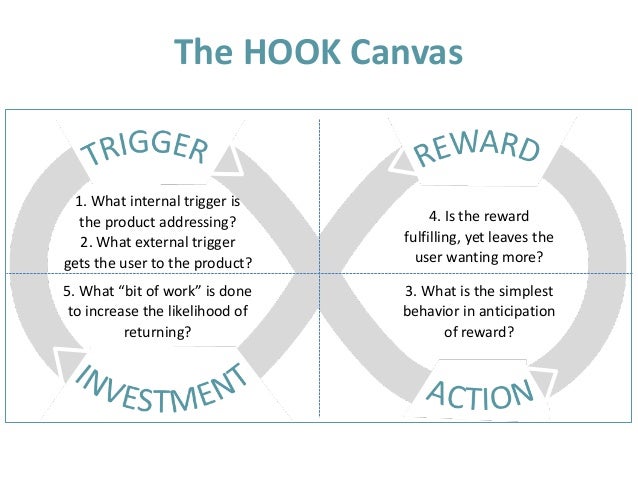
Nir Eyal opened the day with a quick overview of his Hooked model. According to Nir Eyal we can get people "hooked" by ensuring that we are monopolizing on internal and external "triggers" (emails, desires, emotions, tweets, etc) by giving people "actions" to take (tasks, links, calls to action) which create "rewards" (likes, reposts, mastery, competency, resources) that lead into future "investments" to loop them in and reload the next trigger (storing value or content, building followers, pinging someone else so that they respond) Check out this image of the hooked model to get a better idea of how this all works. Nir wrote the book Hooked: how to build habit forming products that outlines the ideas above in great detail. He was also the MC for the day. 

Kintan Brahmbhatt of Amazon and "Friction"

Kintan Brahmbhatt, the Head of Products for Amazon Prime spoke about reducing "friction" in user experiences by discovering where people are struggling and how to smooth those places out to make better experiences. He described friction as anything that comes in the way of a user's ability to achieve his/her objective. When a new user has a new toy (your app or tool) and things are going well, they're delighted, which is always the goal, BUT delight + friction = disappointment. For instance, a new toy (delight) + no batteries (friction) = disappointment.

The three types of friction he called out were:

  1. avoidable effort needed to complete a task
  2. unnatural context switching
  3. count and complexity of decisions

Minimizing these will maximize people's satisfaction with your product and decrease the likelihood that any habitual use will ever be broken, meaning they won't switch to a competitor. Kintan emphasized that discovering and prioritizing which fiction points to resolve is the hardest part.

Natalie Nahai and Psychological Principles

The very fast talking Natalie Nahai, covered a series of psychological principles that could be used to override people's conscious thought and build habits or product addiction. It was slightly terrifying and very impressive to hear her discuss all of the consumer psychology standards that have been developed over the years and how to apply them to the web. Her book Webs of Influence comes highly recommended.

Here are a few examples of principles that she outlined:

  1. Endowed Progress If something looks partially completed at the outset, the chance of completing it is twice as high. For example, a buy 8 and get one free card works twice as well if it's a buy 10 and get one free with two already punched.
  2. Sunk Cost Fallacy We will stick with something if we've already invested in it, even if it's not in our best interest. For example, I'll keep playing this game because my player is so high level, I've put a ton of time into it.
  3.  Opportunity Cost We'll trade money for things like time if the cost of waiting is high enough. This is a case where "fun pain" comes in; people playing a game that requires waiting (like training troops in Clash of Clans) will pay to get rid of their fun pain and make the troops train faster. And a great way to remove the pain of purchasing even further is to introduce an intermediate currency.

At the end of this session, a woman asked, "How do we prevent children from becoming addicted via these subconscious patterns?" And the answer was, "You can't!" Learning about these principles doesn't make them not work on you. The best way to keep kids (and yourself) safe from games like Angry Birds is to limit screen time and focus on what the game or app is getting from you, so that you're conscious of the corporate will behind the principles. I've decided I'm going to give myself more slack for being addicted to Clash of Clans.

Know Your Users

User-Centered Design

There were a few of great presentations on user-centered design and user research featuring design and research leads from Twitter (Ximena Vengoechea) and Instagram (Bo Ren). These presentations emphasized starting with research before ever building anything. Asking questions like:

  • What are we changing?
  • What is our goal?
  • How do people feel when they open my app?
  • When do people use this tool?
  • What does my user's happiness depend upon?
  • Where is my user coming from? What in their life experience is most relevant to my product?

In particular, I appreciated that these two focused on the potential positive impact of their work. Bo Ren said, "Good products aren't just delightful, they help you take action toward a goal." As someone who isn't a heavy app user, I was glad that there was more emphasis in their presentations on thinking about people in a positive way by solving a problem they have, rather than just getting them hooked.

Neuromarketing

Roger Dooling presented on all of the wild technologies out there that power companies are using to test the physical and neurological responses of their consumers. He emphasized the fact that 5% of our decision making is conscious, so asking users what they think is not that meaningful. A few processes he called out were fMRI, eye tracking, facial coding, and EEG. At this point, the research is just starting to come in on whether or not these tools can be used as indicators of potential purchases, with fMRI being the best indicator at this point. Today these sorts of studies are very expensive, but with the advent of wearables like the Apple Watch, it may become easier and easier to study people's unconscious responses to your products.

My takeaways

I have to admit that going in I had hoped there would be a little more self-awareness in the community: questions of ethics, presentations on positive habit formation, not just a focus on addictive habit formation, but it was extremely interesting despite that. And there were a few examples of people using these techniques for things like reducing energy consumption. Let's do more of that and get these concepts into the non-profit world! "We planted two trees for you, plant eight more and get a tree hugger t-shirt" That one needs work, but you know what I mean.

I'd also like to further explore how we can use these sorts of tools and principles to relieve friction in the workplace using tools that allow people to come to their work with the unconsciousness that they open their favorite app. Companies like Slack are working in that sphere these days, which is pretty great.

Posted in:
Linnea Williams profile pic Posted by Linnea Ann Williams on Thursday, September 18, 2014 - 8:29am

Over the last year Stanford Web Services has been building reusable modules to make website building faster and better, and then adding them to Stanford Sites. This post highlights Stanford BEAN Types.

What are BEANs (the non-legume, Drupal ones)?

For those who are unfamiliar, the BEAN module is for creating entities in Drupal that are similar to Drupal's core Blocks, but that can have fields like image or link in addition to the main text area. BEAN is an acronym that stands for Block Entities Aren't Nodes.

Like Drupal's content types, there can be multiple BEAN types. For instance you might have a Banner BEAN type or a Contact info BEAN type, with each having different fields and different display settings.

Stanford BEAN Types

Stanford BEAN types, now on Stanford Sites, provides default BEAN types that we have designed to help make beautiful websites faster! Contained in this feature are the Stanford Banner, Stanford Contact, Stanford Large Block, Stanford Postcard, and Stanford Social Media Connect BEANs.

Site administrators can create any number of these BEAN blocks and place them on their site's pages using the Block interface or the Context module.

Stanford Banner

This bean type provides a block that can be used for image banners. Users can add an image, credits, source information, and a caption.

Example:

Screenshot of Banner (large image with caption overlay

Stanford Contact

This BEAN type provides a uniform and easy-to-edit contact block. Users can add an address, fax, phone number, email address, and a number of links. When placed using a Stanford theme end users will see a nicely formatted address block. This block type is great for adding to your footer area.

Example:

Contact block screenshot with each field filled out

Stanford Large Block

This BEAN can be used for larger amounts of content than a traditional sidebar block. You can insert files and images into the body content. There is no header image on this block. When we need to add a large block of content in the main body area of a page, we use this block type.

Example:

Screenshot of a large block used to list announcements in a list

Stanford Postcard

This is the flagship of the Stanford BEAN types module. It's the most flexible building block of the BEAN types. This block allows users a lot of flexibility as it has options for header image upload, more-links, and wysiwyg content. We use this BEAN type constantly in our development!

Why do we call it postcard? Because it's part image and part text.

Example:

Screenshot of example postcard block "Featured Course"

Stanford Social Media Connect

This block provides a group of social media icons that link to your social media pages. Included in the options are: Facebook, Twitter, GooglePlus, LinkedIn, YouTube, Vimeo, Tumblr, Pinterest, Instagram, and Flickr. In conjunction with the Stanford themes, this block will have nicely formatted uniform icons for all of your social media links.

Example:

Screenshot of Connect block with links to feacebook, twitter, google+, linkedin, youtube, vimeo, tumbler, pinterest, flickr

Sub Modules

Stanford BEAN Types Permissions
Stanford BEAN Type Permissions module provides some out of the box permissions. This module may be safely disabled and overridden through the permissions setting page.

We hope you enjoy this new module!

Posted in:
Linnea Williams profile pic Posted by Linnea Ann Williams on Wednesday, July 30, 2014 - 1:18pm

Agile has become a big buzz word recently in the project management world. In this post, I'll try to clarify where some of the lines are being blurred between terms like Agile and Scrum, and what some of these terms actually mean.

Keep in mind while reading this that I am primarly trained in Scrum, so my descriptions of other Agile methodologies are only decently informed. :)

What is Agile Project Management?

From the ever-present wikipedia:

Agile project management is an iterative and incremental method of managing the design and build activities for engineering, information technology, and new product or service development projects in a highly flexible and interactive manner, for example agile software development.

The primary words to take into account here are iterativeincremental, highly flexible, and interactive.

Unlike traditional Waterfall approaches to project management, Agile seeks to build products from the perspective that not all requirements can be fully scoped at the beginning of a project, no matter how fastidious the discovery and documentation. And that better products come from being tested and revised while they're being built.

With Agile, we don't make a plan and follow it to the letter from start to finish; we allow the products we're building to morph into better products along the way.

The Agile Manifesto

The first step towards figuring out Agile software development is to become familiar with the Agile Manifesto. It was written in 2001 by a group of PMs and developers who were successfully experimenting with Agile approaches. Their successes lay in a few primary tenets:

We are uncovering better ways of developing
software by doing it and helping others do it.
Through this work we have come to value:

Individuals and interactions over processes and tools
Working software over comprehensive documentation
Customer collaboration over contract negotiation
Responding to change over following a plan

That is, while there is value in the items on
the right, we value the items on the left more.

Each type of Agile methodology, whether Scrum, LeanUX,or Kanban addresses these primary tenets in slightly different ways, but they should always remain core to an Agile strategy.

You can learn more about the Agile Manifesto at: http://agilemanifesto.org.

What are some examples of Agile methodologies?

Scrum

Scrum is a system rooted in regular cycles of work called Sprints. Each Sprint has a fixed length of time, a set group of meetings (including the daily scrum, from which this methodology derives its name), and a defined set of work that the team has agreed upon. The work for each Sprint is taken from the top of a carefully prioritized Backlog of features to develop, which provides the majority of the documentation for the project in bite-sized chunks. Work is released early and often and revised as needed. For more about Scrum, you can watch my recent presentation on the basics of Scrum.

Watch my presentation on how Scrum works (there are some small audio glitches)
Read a detailed description of Scrum on Wikipedia

Kanban

Like Scrum, Kanban for software development is based on working from a prioritized Backlog. Unlike Scrum, which sets predefined cycles in which small subsets of the work will be completed (Sprints), Kanban prevents team/process overload by limiting the number of items that can be worked at concurrently. Kanban keeps a constant flow of work in motion, ensuring that everyone is allocated just the right amount of work at any given time. This is called limiting Work in Progress or limiting WIP. Kanban also focuses on process and product iteration with structured feedback loops.

Learn more about Kanban on Wikipedia

Lean software development

While Scrum comes with a lot of very specific team members, meetings, and mapping workflows, Lean is more of a group of principles and tools for building your own processes. These tools and tenants were derived out of manufacturing approaches developed by Toyota. Lean development can be summarized by seven principles:

  1. Eliminate waste: Any wasted time, unnecessary steps, manual testing, unused code, etc should be eliminated.
  2. Amplify learning: Speed up cycles and feedback loops by using automated testing, user testing, etc.
  3. Decide as late as possible: The further along you are in a project, the more you know. So decide later, when you know more.
  4. Deliver as fast as possible: The sooner you've delivered something, the sooner you can get real feedback into making it better.
  5. Empower the team: Find good people and let them do their job.
  6. Build integrity in: Make sure the code is clean, and everyone feels good about it, from developer to client.
  7. See the whole: Carefully define relationships between collaborating teams, and different software components

Learn more about Lean development on Wikipedia

Extreme Programming

Extreme programming (XP) is rooted in frequent releases and short development cycles, interspersed with opportunities to adopt new customer requirements. The idea is to take the healthy aspects of software development and taking them to the extreme!

Some features of Extreme Programming include:

  • programming in pairs or doing extensive code review
  • unit testing of all code
  • avoiding programming of features until they are actually needed
  • a flat management structure
  • simplicity and clarity in code
  • expecting changes in the customer's requirements as time passes and the problem is better understood

Learn more about Extreme Programming on Wikipedia

Scrum, one Agile approach

There are lots of different methodologies (certainly more than I've listed here) that are considered a part of the Agile family and each addresses the Agile Manifesto in slightly different ways. Scrum is just one type of Agile software development in suite of many. I hope that helped to clarify things for folks.

And keep in mind: because the world is a complex and messy place, many of these methods get adopted in part and mixed and matched. Our team currently alternates between Scrum and something resembling Kanban.

What are you currently using and how is it working for you?

Linnea Williams profile pic Posted by Linnea Ann Williams on Monday, June 23, 2014 - 3:05pm

Caches are a great tool, they store your website's database and code information in a way that loads much faster. But they DO mean that your changes don't appear right away.

Where are my changes?

One of the things we here at Stanford Web Services get emailed about most frequently is, "Why did my changes disappear when I logged out?" The answer is that the site caches haven't yet been updated, but they will if we wait a little bit (sometimes a few hours or so).

I'll admit, I struggle with the idea that we need to wait for changes to appear. I click the "clear site caches" link all the time to make my changes go live immediately. It's so satisfying! This is the digital age and we want our changes right now.

But then here's what happens: every page on the site loads WAY slower for the next visitors, and sometimes hiccups appear. For example, I've seen styles disappear for a minute or two. Caches are great, and we put them in place for a reason. So, I'm going to propose this list of other things to do while my site caches clear on their own. My mid-year's resolution will be to do these instead of clearing the caches manually. Join me!

Top 6 things to do while your cache clears

In the spirit of Buzzfeed, here are the top 6 things I'm going to do next time I want to clear the caches to make my edits appear on a website immediately.

6. Monterey Bay Penguin Cam - Watch some cute penguins

Screenshot of Penguin Cam

http://www.montereybayaquarium.org/animals-and-experiences/live-web-cams/splash-zone-penguin-cam


5. Tech briefings - Attend a tech briefing (or watch a video)

Screenshot of Tech briefings website

itservices.stanford.edu/service/techtraining/techbriefings


4. Be Well - Attend a Be Well workshop on stress, nutrition, forgiveness

photo of someone meditating that links to Be Well program

bewell.stanford.edu/ They're kind of like this. :)


3. Lumosity - Brain train with these fun games

Lumosity logo

www.lumosity.com


2. Events.stanford - Attend a lecture or visit an art exhibition

Image of Stanford Powwow dancers

events.stanford.edu Stanford Powwow is an excellent option, if it's going on.


1. Pick fruit - Check out this map of fruit trees on Stanford campus

Closeup photo of oranges

tusb.stanford.edu/2010/01/map_of_all_edible_fruit_trees.html

Linnea Williams profile pic Posted by Linnea Ann Williams on Monday, March 31, 2014 - 10:02am

Imagine you're an academic department or program and you're starting on a project to revamp your web presence. The first thing you'll need to do is figure out who should be on your internal web team that will see the project from inception to launch. This might be some combination of your staff, faculty, and students. But who exactly?

Choosing the right web team is really important to the success of your project. To reach your launch in a timely fashion, you'll want detail-oriented and tech-savvy folks to get things moving and collaborate with your web developers, and regular check-ins with stakeholders to make sure you're aligned with their vision.

Stakeholders vs. web team

There are two primary groups of people that you need to keep in mind when embarking on a web project: stakeholders and your web team. Stakeholders are the primary people who will be viewing, represented by and/or effected by your new website. Your web team is the group of people in your program or department who will work hard to complete your project.

It's easy to accidentally conflate these two groups and think that your stakeholders are who should be on your web team. I've heard, "We are guaranteeing that everyone is involved so that no one can be unhappy at the end of our project!" But I'd like to assert that doing so can compromise the success of your project, especially once it's time to get to work.

Stakeholder goals

  • The site does everything I need and want it to.
  • I like how my pages look.
  • The general look and feel of the site represents us well.
  • We are sufficiently on budget.

Web team goals

  • All content has been ported and is consistently worded and formatted.
  • Images are well chosen and properly formatted.
  • The site looks good.
  • The site has sufficient functionality for this phase of the project.
  • There are no broken links anywhere in the content.
  • Everything is tagged correctly, if relevant.
  • We are on budget and focusing on highest priorities to maximize value.
  • Stakeholders are happy with the end result.

As you can see, though there is some overlap between the goals of the two groups (the site looks good), they aren't aligned. Stakeholders are often more interested in making and prioritizing requests for functionality in a website. Whereas, the web team is primarily interested in getting the site to a successful and timely launch, and willing to do the work to make it happen. Both groups are critical to the success of a project, but each should be asked to do tasks that are aligned with their goals, to keep things moving forward smoothly.

Stakeholders in a web team-led project

Stakeholders should always be involved in the major decision-making for a project because they need to be really satisfied with the site after launch. However, stakeholders often aren't interested in the hard work piece of putting a site together, such as:

Web team tasks

  • Quickly learning new technologies
  • Regular meetings with web development team (often these happen weekly or even twice a week during peak development)
  • Reviewing and revising existing site content
  • Collecting, cropping, and uploading images
  • Copying and pasting old profile information
  • Gathering quotes, news articles, publications, etc.
  • Creating categories for events, news, people, etc.
  • Tagging imported content
  • Checking every link on the site to make sure it isn't broken
  • Communicating requirements and bugs to web development team

If stakeholders aren't the right people for the tasks above, how can you keep you keep them involved so that you deliver a site at the end of your project that is well-received? There are lots of great ways!

Stakeholder involvement

  • Engage in stakeholder discovery to uncover website functionality requirements/needs before the project kickoff. This may take the form of a couple group meetings or individual "interviews" with your stakeholders.
    • What are stakeholder expectations for the project?
    • How would they define a successful outcome?
  • Regular check-ins, especially at key junctures, which might include:
    • Short presentations at monthly faculty meetings
    • Welcoming direct feedback on design comps or wireframes at sign-off stage for these deliverables
    • Inviting feedback a few weeks to a month before launch, especially in regards to content and wording
    • Requesting feedback after the site has been live for a few months, to help you plan for future improvements

If you've been on a project, you've had to think about stakeholder involvement. How do you keep your stakeholders involved? Feel free to leave a comment below!

Linnea Williams profile pic Posted by Linnea Ann Williams on Tuesday, January 7, 2014 - 8:00am

Welcome back! We're kicking off the new year with a post on Agile Project Management. I've been speaking a lot to folks recently about Scrum and how to think about incorporating it into your team structure.

One form of Agile project management, Scrum is an iterative development process that focuses the development team on the highest priority work and increases the product/project manager's ability to forecast timelines and delivery. For Web Services, it has improved our project estimates and helped us to work in a more focused way on our larger projects.

If you want to learn more about Scrum, there are a lot of great resources out there. These are some of my favorites.

Websites

Agile Atlas

Agile Atlas is a website created by the Scrum Alliance to provide descriptions of all terms and processes involved in scrum. From the site's About page: "The purpose of this site is to provide an 'encyclopedia' of information about Agile and related methods.... The "center" of the site is 'Core Scrum'. This is a Scrum Alliance supported description of Scrum. It is consistent with other definitive descriptions, and is the basis for the Scrum Alliance's CSM test."

Learn about Core Scrum

Training and certifications

Scrum Alliance

The Scrum Alliance is a membership organization that encourages and supports the widespread adoption and effective practice of Scrum. It is the organization that certifies scrum professionals and is a great place to find out about upcoming training and read articles about scum practices. If you are a member of the Scrum Alliance, you also have access to additional articles.

Learn about the Scrum Alliance

See recent articles

Agile Learning Labs

Agile Learning Labs is the group that I did all of my Scrum training with. Their training is fun and experiential, I highly recommend. They also have a robust blog that they manage and host regular agile meet ups with interesting speakers.

Check out their blog

See Upcoming Meetups

A few books

Elements of Scrum

This is a super easy read compared to a lot of books on the same or similar subjects. It's the best selling Scrum book out there and I highly recommend it!

See the book's details

Agile Software Development with Scrum

A classic in the Scrum arena, recommended to me by others on Stanford campus.

See the book on Amazon

Agile Project Management for Dummies

This was my introduction to Agile and I think it's another friendly read for those who want to learn more about Agile practices. It's a bit of a misnomer, though, since it really focuses on only Scrum.

See the book on Amazon

At Stanford

Stanford Agile Community of Practice & Email List

Every few weeks, some of the people on campus interested in and/or practicing Agile get together to discuss practices. If you are interested in joining, contact me and I'll connect you with the organizer.

Learn more about the COP

On Youtube

Check out this video that I've included in previous posts: Agile Project Management in a Nutshell

Linnea Williams profile pic Posted by Linnea Ann Williams on Tuesday, October 15, 2013 - 9:05am

Earlier this year, I wrote a blog post about using Menu Block module. In this post, I'll talk about how Menu Block integrates with Stanford's Drupal 7 themes to create dropdown menus.

To properly leverage the dropdowns in Twitter Bootstrap with Drupal, there are a few things to keep in mind...

Note: This post pertains to these Drupal 7 themes:

  • Open Framework
  • Stanford Framework
  • Stanford Wilbur
  • Stanford Jordan

Menu Block module to wrangle dropdowns

If you've been following the Menu Tricks blog series, you'll know that I'm a supporter of placing all menu items into one giant menu, which sets you up to have a dropdown menus (and many other great things that you can see in the Menu Tricks series), but puts you in the position of having additional pop-ups for items that are three levels down in your menu or more.

Here at SWS, we think that in most cases dropdowns should only ever display one additional level of menu items. Otherwise you risk what I like to call Navigation Overload: things like flyouts, with which even the handiest mousers struggle.

To constrain your menu items to just the top navigation and a single-level dropdown, you can use Menu Block module. Here are the settings your Menu Block will require:

  • Use the Main Menu to build the block
  • Start at the primary level in the menu
  • Make the maximum depth 2
  • Place this new menu block into your Navigation region

Configuring menu items to expose dropdowns

There is an additional step required to make your dropdowns work. Dropdowns use javascript to hide the sub-items in your menu until someone clicks on the top level item, which means that those items need to be expanded in the code at all times. Otherwise the dropdowns won't know that there are any items to display.  

To expand all of your top level items to make those links available to the dropdowns:

  • navigate to your Main Menu list of links (/admin/structure/menu/manage/main-menu).
  • Edit each of your top level menu items
  • Check Show as Expanded

Dropdowns on click, not on hover: Top-level items are no longer pages

Historically, it's been very common to see dropdowns on hover, meaning that the menus expand when a mouse hovers over the top-level menu item. However, because it's very common for people to visit a website on a mobile device or tablet, it's becoming standard for dropdowns to open when someone clicks (or taps) on the top-level menu item. Dropdowns on click/tap is how the Stanford Drupal themes have been configured.

The primary ramification of dropdowns on click is that top level items are no longer pages. There are various ways you can work around having top-level items be links only and not navigable pages. The way Web Services is now configuring our websites that use dropdowns is thus:

Blank pages that redirect to the first subpage

Because Web Services likes to use pages to automatically build our URLs, we like to build pages for our top level items and then redirect them using the Redirect module to the first page in the second level of the menu. You can see that in action at undergrad.stanford.edu.

If you have other ways you've worked around top level items being links not pages, feel free to leave a comment about your approach!


Posted in:
Linnea Williams profile pic Posted by Linnea Ann Williams on Tuesday, September 3, 2013 - 9:23am

In June, I wrote a post about the role of the Scrum Product Owner in a website project. For this post, I'll outline the role of the Scrum Master and how it differs from the Product Owner role.

Scrum Master vs. Product Owner

In traditional projects, there is often one single Project Manager that works to make sure the team is working on the highest priority tasks, staying on task, and moving the project through each phase to completion (often as quickly as possible). What can happen if the PM isn't extremely careful, is that their role becomes that of a task master and there's a lot of "Are you done yet?" but very little advocacy for team sanity, because the PM is trying to hold the goals of the stakeholders (do more and faster!) and the goals of the team (make clean code, maintain work balance) at the same time, but stakeholders can tend to overshadow the team.

In scrum, holding the goals of the client and holding the goals of the team are separated. The Scrum Product Owner keeps track of stakeholder priorities and advocates for the project. Whereas the Scrum Master holds space for the team, making sure that they are working at a sustainable pace, that there are no impediments to their success, and that they feel confident that they can acheive the short term goals set in front of them.

Facilitating Learning and Removing Impediments

Adopting Scrum Practices, Empowering the Team

A Scrum Master's job is to be the primary coach of Scrum principles. The Scrum Master leads scrum meetings (daily stand ups, sprint planning meetings, sprint reviews, sprint retrospectives) until the team feels confident to do it themselves. The Scrum Master also facilitates the use of scrum artifacts like the sprint backlog (where all pending work is listed and prioritized) and sprint burndown charts (where the individual sprint's pending tasks are tracked over the course of a sprint).

The long term goal is that the team will be so comfortable with Scrum practices, they can lead themselves.  At that point it is possible to have what are called Working Scrum Masters, who also work directly on the project. Sometimes the Scrum Master role even rotates throughout the team members on a sprint by sprint basis.

Advocating for the Team, Removing Impediments

A Scrum Master is also the official advocate for the development team. In sprint planning meetings, when the Product Owner works with the team to define what is possible in the current sprint, the Scrum Master acts to balance the expectations and hopes of the Product Owner, asking "what is really possible in this sprint?" rather than "what do we hope is possible?" In daily standups, the Scrum Master helps the team members to identify impediments and work to clear them so that the team can move forward.

The SWS Way

In Web Services we call impediments "blockers" and have a giant inflatible hammer we smash on the ground when someone on the team has successfully "smashed" a blocker. Blocker Smashed!

What Scrum Masters Are Not

A lot of what defines Scrum Masters is what they are not. The Scrum Master is not the boss, they don't provide team directives or define the project priorities. That's the role of the Product Owner. The Scrum Master also isn't a scrum dictator. Scrum Masters need to be flexible and work to implement solutions for the team without following scrum practices so doggedly that they are causing impediments. Scrum practices should be adopted over time and a good Scrum Master will work with the team to find the right scrum fit.

Scrum Mastery in a Nutshell

A Scrum Master:

  • Teaches scrum practices to the team, empowering them to adopt those practices and run with them
  • Leads scrum meetings as necessary
  • Advocates for the team, ensuring that they are working at a sustainable pace
  • Helps identify and remove impediments to keep the team moving forward in the project
  • Does not define project goals and priorities

I hope this post has been helpful in explaining the difference between Product Owner and Scrum Master. If you're interested in learning more, check out Agile Atlas: http://agileatlas.org/atlas/scrum#scrummaster

Pages

Subscribe to Linnea Ann Williams's Blog Posts